


In the current design and construction landscape, the ability to digitally sign drawing files has become an essential requirement for architects, engineers, and technical professionals in many European countries. Regulatory bodies and project stakeholders increasingly demand secure, verifiable and standardised digital submissions, especially when it comes to DWFx files.
Among the available tools, the Autodesk Design Review 2013 continues to play an important role in ensuring reliable and compliant digital signature workflows — especially when used in conjunction with CAD platforms such as LusoCAD, which integrate efficiently with Autodesk-based processes.
The growing importance of digitally signing DWFx files
Digital signatures are no longer optional in many architecture and engineering processes. Public entities and project reviewers often require documentation to be:
- Authenticated with a digital certificate
- Protected against alteration
- Easily accessible through standard tools
This makes the format DWFx (Design Web Format) a preferred choice due to its lightweight structure and compatibility with the Autodesk ecosystem.
However, the challenge arises when applying secure and compliant digital signatures in these files.
Why is Autodesk Design Review 2013 still recommended
For consistency and compatibility reasons, digital signatures in DWFx files are often applied using the Autodesk Design Review 2013, one of the versions that natively supports this functionality.
Main advantages
- Built-in support for digital signing of DWFx files
- Preserve file integrity and signature validation
- It works efficiently with CAD software such as LusoCAD
- Widely recognised within technical review streams
- Free and lightweight tool
Avoiding compatibility issues when signing DWFx files
When digitally signing DWFx files, it is essential to maintain compatibility with review tools and submission platforms.
Different applications can implement digital signatures in slightly different ways. While many tools support digital signatures, not all follow the same structure or the same standards used in Autodesk-based workflows.
To ensure maximum compatibility, the Autodesk Design Review 2013 It remains a widely used reference tool for applying digital signatures to DWFx files, as it follows Autodesk's original implementation.
When using CAD software such as LusoCAD, a reliable approach is to generate the DWFx file directly within the CAD environment and apply the digital signature in Autodesk Design Review when needed, ensuring consistent results across different platforms.
Simple workflow for preparing and signing DWFx files with LusoCAD
To ensure a simple and compliant digital signing process, it is recommended to divide the workflow into two stages: create the DWFx file in the CAD software and Apply digital signature in Autodesk Design Review.
With the LusoCAD, it is possible to efficiently prepare your drawing files for future signing while maintaining full compatibility with Autodesk-based revision tools.
Step 1: Export the drawing from LusoCAD in DWFx format
Start by generating a DWFx file directly from your drawing in LusoCAD. This ensures the file is correctly structured for later review and signing.
You can export the file via:
- Plot, or
- Function Publish
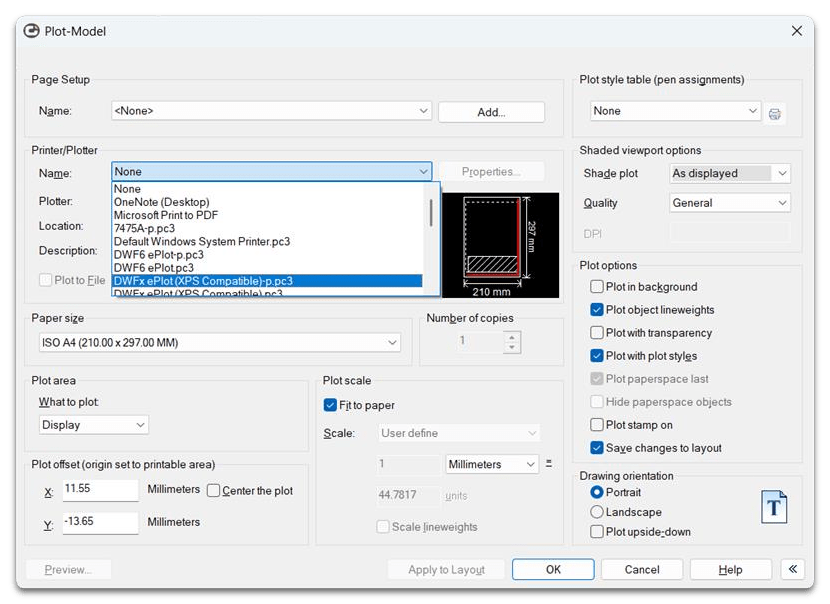
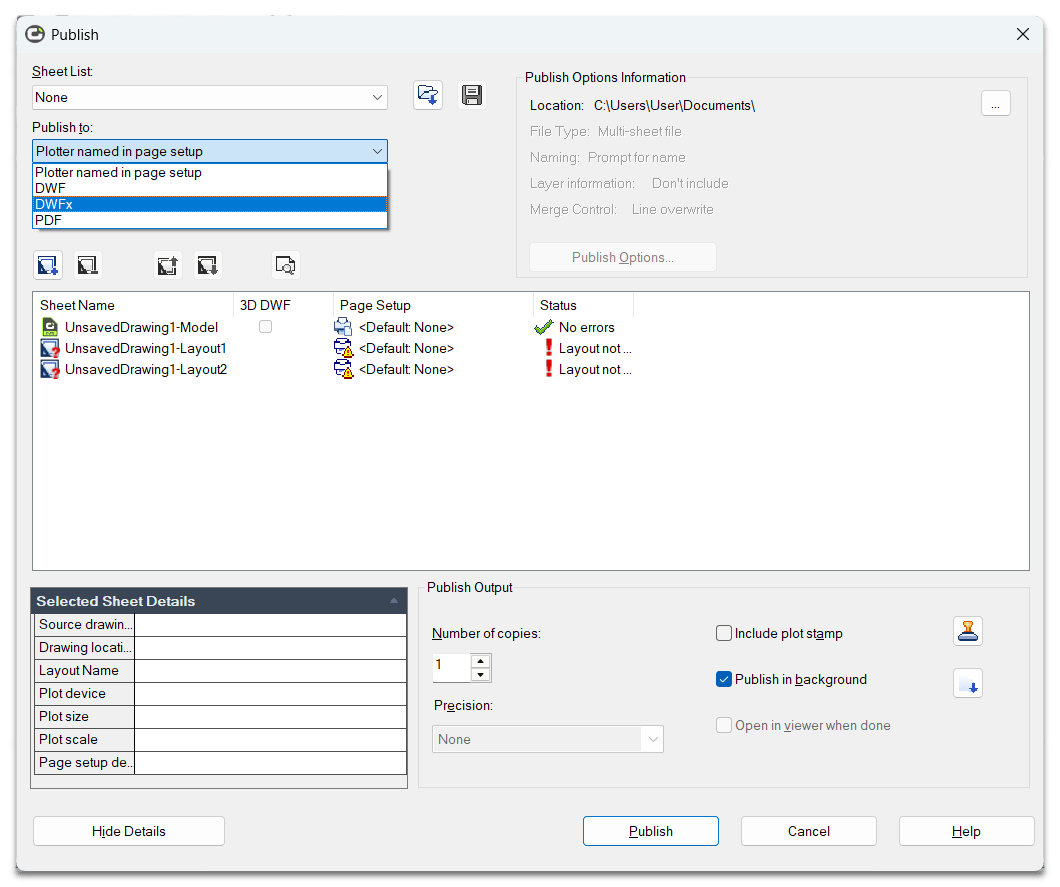
Select DWFx as the output format. This file will be the final version to be digitally signed and shared.
Step 2: Apply the digital signature in Autodesk Design Review 2013
After creating the DWFx file, open it in Autodesk Design Review 2013 to apply the digital signature.
- Open the exported DWFx file in Autodesk Design Review
- Select Security → Add Digital Signature
- Choose yours Digital certificate and confirm
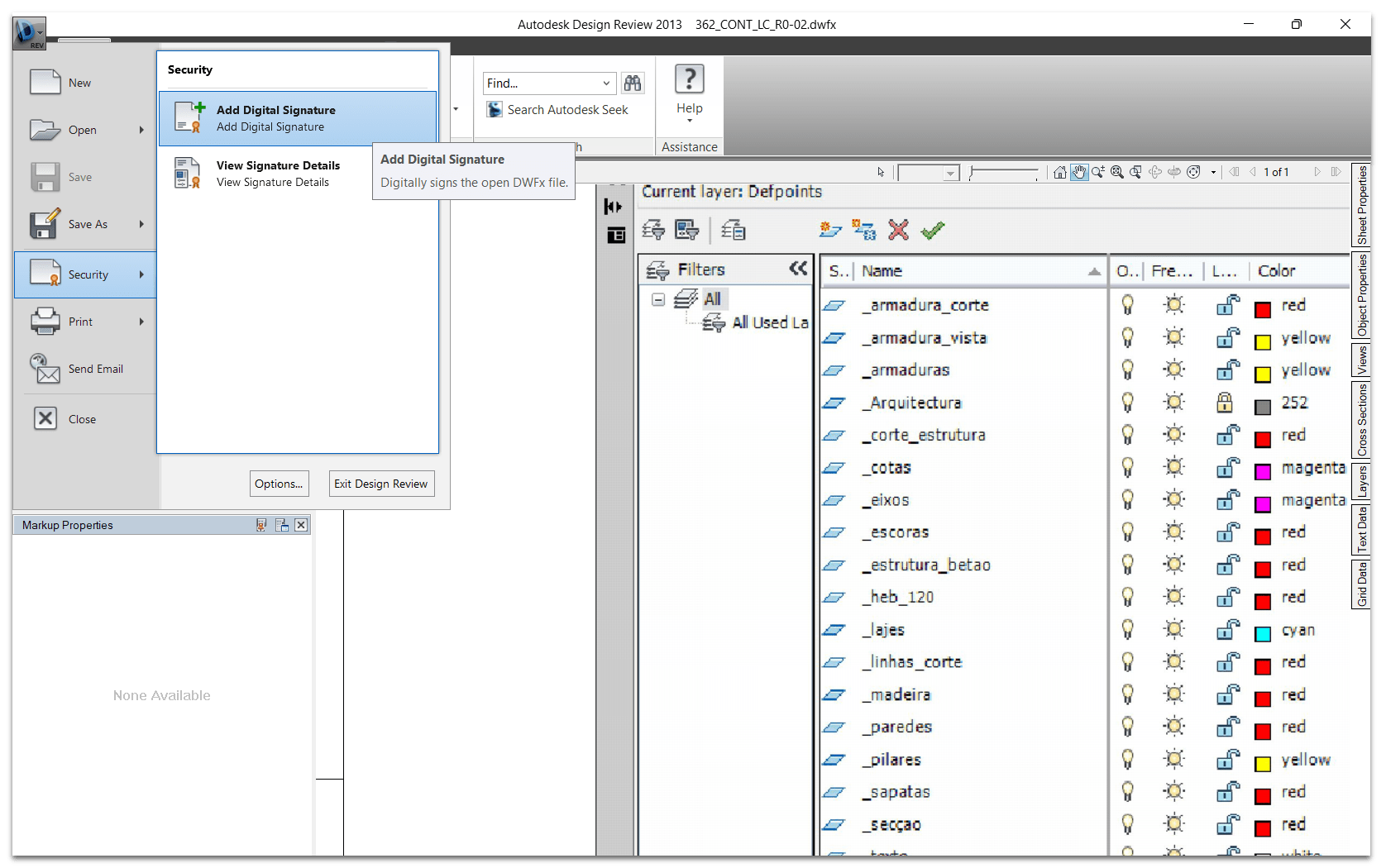
This two-step approach ensures that the file is correctly generated in LusoCAD and signed by a widely compatible method, helping to maintain consistency across different review and submission environments.
After signing, the document is ready to be distributed or submitted with confidence.
Autodesk Design Review 2013 Download
To apply digital signatures to DWFx files with full compatibility, you can download the Autodesk Design Review 2013, version that still supports this functionality.
Select your desired language from the links below:
- Download in English:
Autodesk Design Review 2013 (English)
- Download in English:
- Download in Portuguese:
Autodesk Design Review 2013 (Português)
- Download in Portuguese:
- Baixar em Espanhol:
Autodesk Design Review 2013 (Spanish)
- Baixar em Espanhol:
After installation, you will be able to use the software to reliably view, review, and digitally sign DWFx files in accordance with the requirements of many technical workflows.
Final considerations
O Autodesk Design Review 2013 it remains a go-to solution for digitally signing DWFx files, especially in architecture, engineering, and construction workflows.
When combined with CAD software such as LusoCAD, professionals can implement a simple and effective process that ensures compatibility and reduces obstacles in project submissions.
By using the appropriate tools and following a proven workflow, it is possible to:
- Avoid compatibility issues
- Ensure the safe handling of documents
- Simplify the approval processes
Ultimately, this approach helps to maintain efficiency, compliance and trust in the digital delivery of projects.
Tip: Always check if your digital certificate is valid and recognised by the relevant entities before submitting signed files.

 English
  Portuguese
  Spanish