5 BIM Features You Should Know in LusoCAD

Discover LusoCAD's BIM functionalities and learn how to import, view and export IFC, RVT, STEP and IGES files to improve project collaboration.

BIM (Building Information Modeling) has become an essential element in the architecture, engineering and construction sectors. Far beyond traditional 2D drawings, BIM workflows make it possible to work with intelligent models containing geometric, technical and documentary information, improving coordination between teams and reducing errors during project development.

As projects become more collaborative, the ability to import, visualise and exchange BIM data between different platforms is increasingly important. Just like tools such as Xrefs, dynamic blocks or shared libraries help to improve productivity in CAD, BIM support allows for more efficient integration between different disciplines and software.

LusoCAD includes dedicated tools for working with industry-standard BIM formats, enabling the importation, visualisation, organisation and exportation of models along with their associated data.

In this article, we explore the main BIM features available in LusoCAD.


1. Import IFC Files with Complete BIM Information

The format IFC (Industry Foundation Classes) it is one of the most widely used standards for exchanging BIM information between different applications.

To open an IFC file you can use:

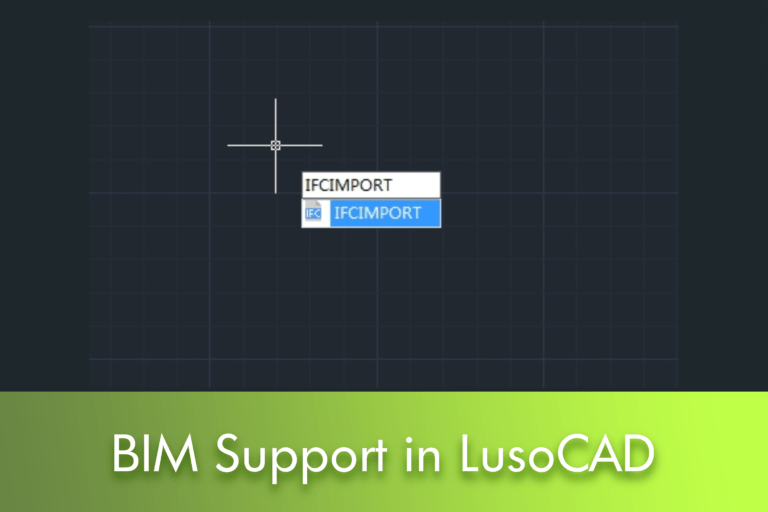
IFCIMPORT

or access:

Ribbon → BIM → Open IFC Files

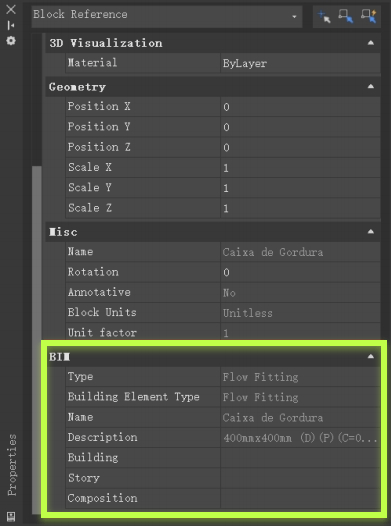
Following the import, the BIM model is available with its respective associated data.

When selecting a model element, you can consult information such as:

  • Object type
  • BIM properties
  • Standings
  • Associated technical data

This information is accessible via the properties panel.
BIM


2. Managing BIM Models with the Structure Panel

One of the most useful tools for working with BIM models is the Structure Panel.

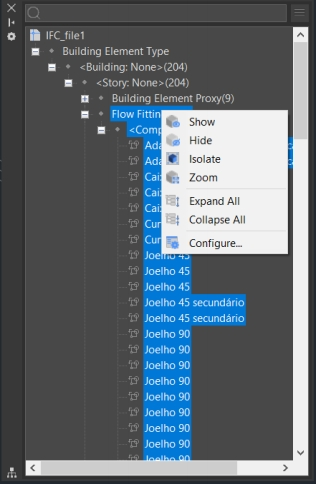
This dashboard presents a hierarchical structure of the model elements, organised based on the BIM data.

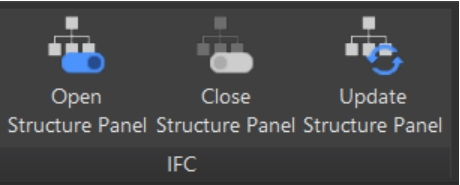
To open the panel:

STRUCTUREPANEL

To finish:

CLOSE STRUCTURE PANEL

For updating:

STRUCTUREPANELUPDATE

What can you do in the Structure Panel?

Through this dashboard it is possible:

  • Locate items quickly
  • Expand or collapse structures
  • Isolate specific components
  • Hide objects
  • Zoom to selected entities
  • Manage the model organisation

This is particularly useful in complex projects with hundreds or thousands of elements.


3. Customise the Model Structure

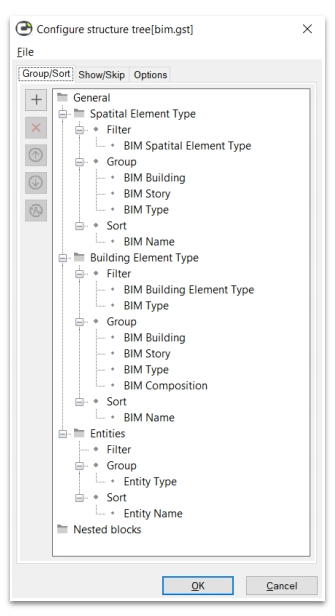
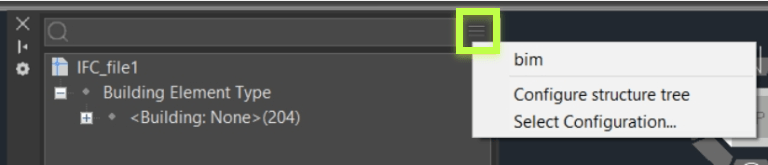
LusoCAD allows you to configure how BIM elements are displayed in the Structure Panel.

Via the option:

Configure Structure Tree

you can create custom organisation rules.
BIM

For example:

  • Group by floor
  • Group by subject
  • Group by object category
  • Sort by BIM properties

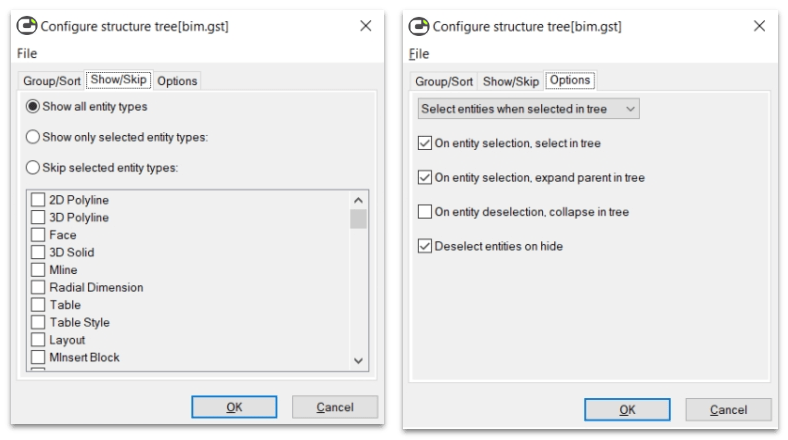
It is also possible to save custom settings via files GST, allowing the same structures to be reused across different projects.


Available Operations

Can you create rules for:

  • Filtering
  • Grouping
  • Sorting

Options include:

Add

Add new rules or properties.

Delete

Remove existing rules.

Move Up

Change the rule priority.

Move Down

Repositions rules in the structure.

Invert conditions

Applicable to filtering properties.

4. Export Models to IFC

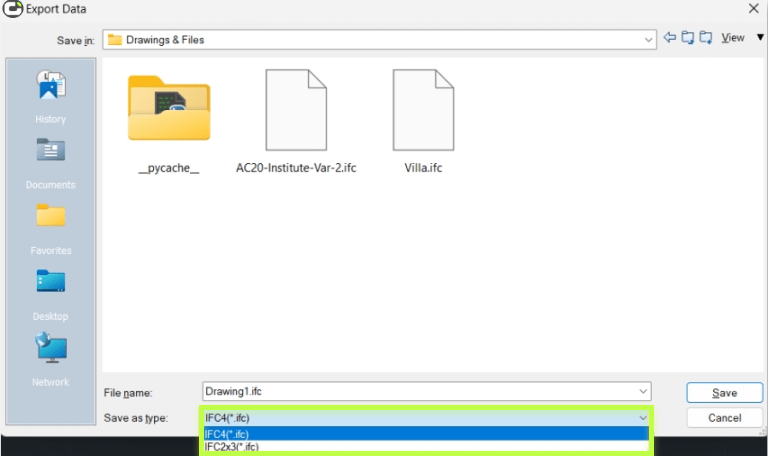
After working on a project, you can export it back to IFC.

Utilise

IFCEXPORT or:
Ribbon → BIM → Export IFC

This functionality allows information to be exchanged with other BIM platforms whilst retaining the data associated with the model.
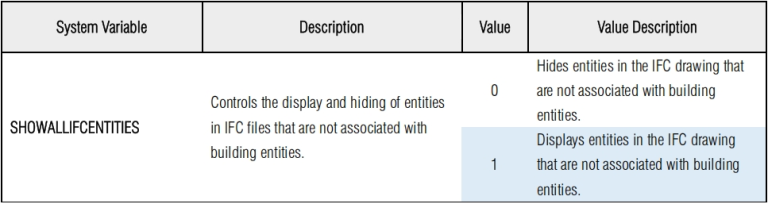
It is particularly useful for:

  • Multidisciplinary coordination
  • Project delivery
  • BIM coordination
  • Team collaboration

5. Compatibility with RVT, STEP and IGES

In addition to IFC files, LusoCAD supports other widely used formats.


RVT File Import

RVT files are usually associated with specialised BIM applications.

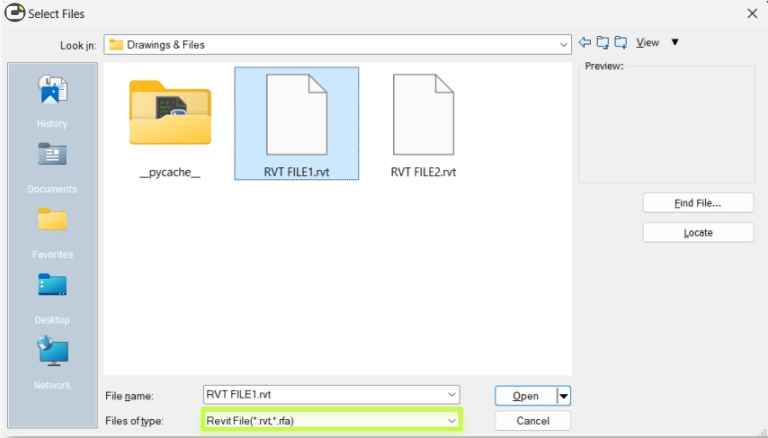
To import:

RVTIMPORT or:
Ribbon → BIM → Open RVT Files

The model is imported, retaining the respective BIM data wherever possible.

STEP support

The STEP format is an international standard used for exchanging three-dimensional models between different CAD systems.

Common extensions:

  • .STEP
  • .STP
  • .STE

It is widely used in:

  • Mechanical engineering
  • Product development
  • Industrial manufacturing

IGES support

The IGES format is another of the most widely used historical formats for exchanging geometry between CAD and CAM platforms.

Common extensions:

  • .IGS
  • .IGES

How to Import STEP or IGES

You may use:

IMPORT

or the commands:

  • STPIMPORT
  • IGSIMPORT

It is also possible to use the import option directly from the file opening menu.


Why is BIM Support Important?

Even for users who work daily in traditional CAD, the ability to open and consult BIM models is becoming increasingly important.

Among the advantages are:

  • Better coordination between teams
  • Access to rich object information
  • Multi-platform compatibility
  • Greater efficiency in data exchange
  • Reduction of cross-disciplinary communication errors

As projects evolve, interoperability has become an essential requirement for many architecture, engineering and construction companies.


Conclusion

The BIM support of LusoCAD allows you to import, view, organise and export smart models using widely used formats such as IFC, RVT, STEP and IGES. With tools like the Structure Panel, the management of large models becomes simpler, whilst import and export capabilities help to improve collaboration between different teams and platforms.

For companies working increasingly in multidisciplinary environments, these features represent an important step in efficiently integrating CAD and BIM workflows.

en_GBEnglish

LusoCAD TRIAL Version

Spanish version:

English version:

LusoCAD More Info

LusoCAD TRIAL Version

LusoCAD

Below you will find a comparative table of the main functionalities available in LusoCAD 2027 and AutoCAD® 2027.

LusoCAD vs AutoCAD®

LusoCAD 2027

AutoCAD®2027

StdProPremiumLTFull
64-bit Support
.dwg for AutoCAD version R14 to latest
.pat,.shx,.lin and etc
Password Protection
File Recover and Audit
Purge
Etransmit
Sheet Set Manager
CAD Standard .dwsX
DWF Underlay
PDF Underlay
DGN Import and Underlay
DWG Convert
Import to WMF, SAT, 3DSPartiallyPartially
Export to DWG, DWF, DWFX, WMF, SAT, STL, EPS, DXX, BMP, EMFPartiallyPartially
Plot and Publish to PDF
Publish to DWF 2D & 3D
IFC Import/Export and EditXXX
RVT Import and EditXXX
Single-document Mode
Digital Signature
Batch Digital Signing Tool
Reset Settings to Default.
Mark UpXXX
STEP/IGES FilesXX
DWGUNITS
Drawing MergeXX
Connected Support FilesXXXX
Activity InsightsXXXX
Connected ReferencesXXX

LusoCAD 2027

AutoCAD®2027

StdProPremiumLTFull
3D Modelling Workspace
Quick Properties
Block Palette XXX
Dark Theme
Hidden Message Settings
WorkSpace command
CUI Menus and Toolbars X
CUI Import & Export
Drag and Drop Customisation XX
Visual Menu Customisation
Ribbon/Classic
Properties Palettes
Design Centre/Tool Palette/Xref Palette
Command Line
Clean Screen
Dynamic Input and Auto Complete
Clickable Command Line Options XXX
File Tab
Floating Windows XXX

LusoCAD 2027

AutoCAD®2027

StdProPremiumLTFull
Navigation CubeX
3D Mouse Device Adaption
Lasso Selection
SELECTIONCYCLING
Right-Click + Drag Method
Selection Preview
Selection Effect Customisation XXX
Quick Select
Select Similar
Multifunctional Grips
OSnap
Grid and Snap
Polar & OTrack
Group
Distance from Endpoint and Divide Segments XX
ADDSELECTED Command
Multiple command

LusoCAD 2027

AutoCAD®2027

StdProPremiumLTFull
Quick Measure by Hovering Rapid Distance Rapid Distance Rapid Distance
DIMCENTER Command PartiallyPartially
Reassociate Dimension
DIMTOFFSET XX
Standard Dimensions
Associative Dimension
Dimension Break
Quick Dimension
Qleader
Dynamic Dimensions
Multileaders
Voice Annotation XX

LusoCAD 2027

AutoCAD®2027

StdProPremiumLTFull
Auto ConstraintXXXX
Coincident ConstraintXX
Perpendicular ConstraintXX
Parallel ConstraintXX
Tangent ConstraintXX
Horizontal ConstraintXX
Vertical ConstraintXX
Collinear ConstraintXX
Concentric ConstraintXX
Smooth ConstraintXXX
Symmetric ConstraintXX
Equal ConstraintXX
Fix ConstraintXX
Constraint SettingsXX
Delete ConstraintsXX
Show/Hide ConstraintXX

LusoCAD 2027

AutoCAD®2027

StdProPremiumLTFull
Linear ConstraintXXX
Horizontal ConstraintXXX
Vertical ConstraintXXX
Aligned ConstraintXXX
Angular ConstraintXXX
Radius ConstraintXXX
Diameter ConstraintXXX
Constraint SettingsXXX
Delete ConstraintsXXX
Show/Hide ConstraintXXX
Parameters ManagerXXX
Dynamic Constraint ModeXXX
Annotational Constraint ModeXXX

LusoCAD 2027

AutoCAD®2027

StdProPremiumLTFull
Mtext
Text
Multi-language Character Set
In-place Text Editor
Mtext Superscript and Subscripts
Support .shx and .ttf font
Spelling
Fields
Text Align / Text Match Text AlignText Align
Change Text X X
Mtext Editor
Text Incremental Copy X X
Text on lineX X
Statistics SummationX X
Check spelling in Mtext
Revcloud
Wipeout X X
Automatic Text Numbering

LusoCAD 2027

AutoCAD®2027

StdProPremiumLTFull
Auto Layer XX
Change to ByLayer (SETBYLAYER)
Layer Properties Manager
Layer States Manager
Layer Translator X
Layer Walk
Layer Previous
Layer Isolate
Layer Unisolate
Layer Lock
Layer Unlock
Layer Unlock All XX
Lock Other Layers XX
Layer Freeze
Freeze Other Layer XX
Thaw All Layers
Layer Off
Off Other Layer XX
Turn All Layers On
Layer Merge
Layer Delete
Layer Match
Viewport Layer

LusoCAD 2027

AutoCAD®2027

StdProPremiumLTFull
Hatch objects from Tool Palettes
Gradient Hatches
Custom Patterns
Background and Colour for Hatch Patterns
Trim/Extend of/to Hatch Pattern Entities
Superhatch X
Transparency for Hatch
Trim/Extend/Hatch preview

LusoCAD 2027

AutoCAD®2027

StdProPremiumLTFull
Raster Image Support (Clipping, Transparency, ...)
Support Kinds of Image Files (bmp, jpg, png, tga, tif, gif, pcx, ...)

LusoCAD 2027

AutoCAD®2027

StdProPremiumLTFull
Lockup Command X X
Layout Merge
Synchronise Viewports
Breakpoint Check (CLOSELINE)XX
Fast Select (FASTSEL)
Change Base XX
Layer Draw Order XX
Stat, Blocks Number Count CommandCount Command
Area TableXX
Break Object XX
Block Break XX
Graphic Compare XX
Batch Purge XX
Layout by Path Array pathArray path
Line2pl XX
SptplXX
LusoCAD Tools XX
Plot tools XX
Drawing Compare DWG CompareDWG Compare
Delete Duplicate Objects (OVERKILL)
Drawing Lock XX
Block Replace

LusoCAD 2027

AutoCAD®2027

StdProPremiumLTFull
Hardware Acceleration X X
Break at Point
Region X
Areasum XX
Draw and Modify Commands
Outline Objects XX
Align Tool / Arrange Tool XX
Real Time Pan & Zoom
SteeringWheels XXX
Magnifier XXX
Redraw and Regeneration
Layout and Paper Space
Non-rectangular viewports
Layout Viewport settings
Multilines and Multiline Styles X
Block create and insert
Redefine Block
Refedit
Dynamic Block - Create/Insert/View Partially
Block Attribute Definition
Barcode & QRcode XX
Dynamic Block Editor (BEDIT) Partially
Table ToolsXX
Table
AutoXLSTableXX
Make Shape
Import Layout as Sheet
Viewport Scale
Attribute Increment XX
Define Layout Viewport from ModelSpace (M2LVPORT) XX
Security X
Free Scale XX
Hatch to Back
Reverse
Synchronise Attributes
Clip
Array Options
Symmetric Draw XX
Smart centrelines/center marks XXX
Invert Fillet XX
Offset Multiple
Helix
Cloud Storage
Design share XX
Shortcut Customisation (CUSTACC) XX
Match Properties Across Drawings
Hyperlink
Digitizer Integration
Scale List
Pline Boolean XX
Xref path repair XXX
Undo/Redo Preview
VPMAX/VPMIN
Table
Barcode & QR Code XX
Non-rectangular viewports
Block Attribute Definition
Dynamic Block Create/ Insert/View/Edit Partially
Smart Blocks XXXX
Geometry TinkeringXXX
AI AssistantXXX
Forma Data Management EssentialsXXXX
CheckoutXXXX

LusoCAD 2027

AutoCAD®2027

StdProPremiumLTFull
POLYSOLID XX
PLANESURF XX
SURFOFFSET XX
CONVTOMESH XX
CONVTOSOLID XX
CONVTOSURFACE XX
CONVTONURBS XX
Point Cloud X
3D Edition Grips XX
Section Plane XX
Flatshot XX
Solid editing XX
3D Surfaces X
ACIS Modelling & Editing XX
Camera XXXX
3D Orbit options X
Render XX
Visual Styles ManagerXX
Solprof / Solview / Soldraw XX

LusoCAD 2027

AutoCAD®2027

StdProPremiumLTFull
CTB & STB Plot Style Files
Built-in Print Driver
Import & Editing of Page Setups
Publish
Hide and Shade Plot
Batch Print XX
Arrange Frame XX
Plot Styles Table Editor
3D Print Studio XXXX
AUTOPUBLISH

LusoCAD 2027

AutoCAD®2027

StdProPremiumLTFull
Load Python
LISP Debugger X
LISP vl-, vlr-, vla- and vlax X
LISP Encryption
(SDS/ADS) X
DCL / DCL engine / COM API X
Visual Basic for Applications X
VBA VBI projects support XDVB
.Net Framework X
GRX (LusoCAD Runtime eXtension) XARX
CUI Menu Support/Diesel Expressions
Diesel Expressions
MNU and MNS File Support
API (Toolbar & Menu Customisation) X
Entity Data EditorX
Action Recording and Action MacrosXXXX

LusoCAD 2027

AutoCAD®2027

StdProPremiumLTFull
Subscription
Perpetual Licence XX
Stand-alone USB dongle XX
Network USB dongle XX
Stand-alone Licence
Network Licence XX